
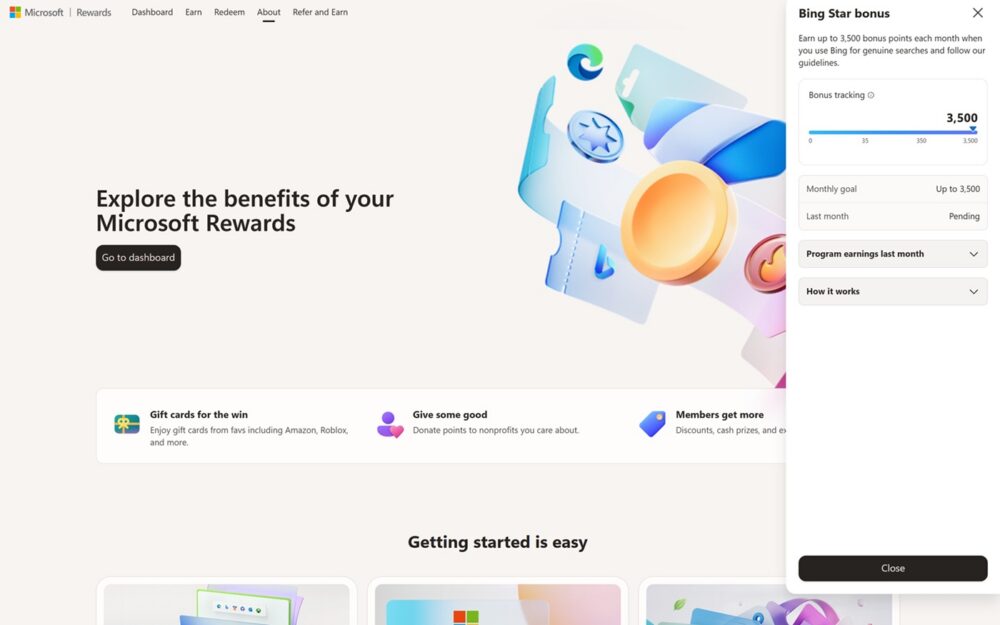
If you’ve logged into Microsoft Rewards recently and noticed a new tracker labeled “STAR Bonus,” you’re not imagining things. It’s one of the biggest changes to hit the program in years, and it has genuinely reshaped how serious point-collectors approach their daily Bing habit.
Here’s what it actually is, how it works as of July 2026, why so many people aren’t hitting the max, and how to actually get there.
What Is the STAR Bonus?
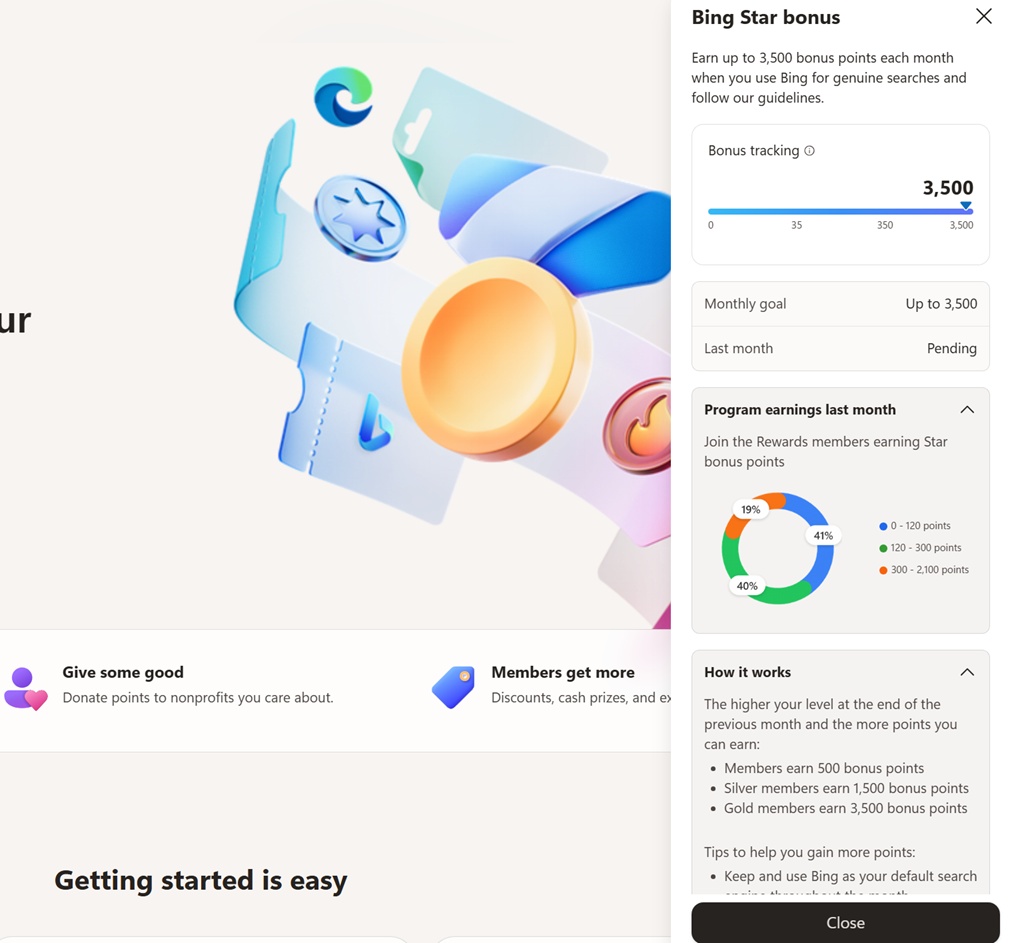
The STAR Bonus is a monthly points allocation tied to Bing search behavior, introduced as part of Microsoft’s broader 2026 overhaul of Microsoft Rewards. Instead of the old model — where you got a small, instant point payout every time you completed a search — the STAR Bonus works in the background all month long, tracking how consistently and naturally you use Bing, and then pays out a lump sum of points at the end of the billing cycle.
It’s only available to members in the middle and top tiers of the new system: Silver and Gold. If you’re still sitting at the entry-level “Member” tier, you won’t see a STAR Bonus tracker at all — that’s expected, not a bug.
What’s the Max Monthly Goal as of July 2026?
As of July 2026, the maximum STAR Bonus payout is 3,500 points per month, and it’s reserved for Gold-tier members who hit every qualifying activity consistently across the month. Silver members can access a STAR Bonus too, but their ceiling is lower than Gold’s.
To put that in context: Gold tier alone already comes with a 60-point daily search cap and a 420-point monthly tier bonus. Layer the full 3,500n-point STAR Bonus on top of that, and a highly consistent Gold user can meaningfully boost their monthly total — before even counting Xbox, Microsoft Store, or Daily Set activity.
How the STAR Bonus Actually Works
Rather than crediting points instantly, Microsoft tracks your STAR Bonus progress throughout the month on a dedicated tracker inside the Rewards dashboard. A few things define how it accumulates:
- It rewards pattern, not volume. The bonus is designed around consistent, authentic daily search behavior — not cramming in a huge batch of searches once a week.
- It resets monthly. Your progress bar starts fresh at the beginning of each cycle, and unused progress doesn’t carry over.
- It pays out at the end of the month. Unlike search points, which land in your balance the moment you search, STAR Bonus points are calculated and redeemed once the month closes out.
- Streak-breaking matters. Multiple users have reported their STAR Bonus getting stuck at a low number (some report being capped around 30 points) despite regular Bing use — often traced back to gaps in daily activity or using a non-Edge browser extension rather than Edge itself.
Why You Might Not Be Hitting the Max
If your STAR Bonus tracker looks disappointing compared to what you expected, you’re not alone — this is one of the most common complaints in Microsoft’s own community forums right now. A few likely culprits:
- You’re not on Gold tier. Silver members have a lower STAR Bonus ceiling than Gold, so if you’re expecting the full 3,500 and you’re Silver, the math won’t add up.
- You’re not searching every single day. The bonus rewards month-long consistency. A few days of inactivity — even if you make up the search volume later — can quietly cap your progress.
- You’re using a third-party browser or extension instead of Edge. Several users running Microsoft Rewards through browsers like Opera, or via extensions rather than native Edge, report their STAR Bonus freezing at a low number even though their regular search points still credit normally.
- Regional rollout differences. The STAR Bonus rolled out in waves throughout 2026, region by region, so the exact mechanics, caps, and even the presence of the feature can vary depending on where your account is registered.
- Automated or “bot-like” search patterns. Because the bonus is explicitly designed to reward “natural” behavior, search patterns that look scripted or artificially timed can suppress the bonus rather than boost it.
Tips to Maximize Your STAR Bonus
- Search daily, not in bursts. Spread your searches across the month rather than trying to front-load or catch up in binges. Consistency is the core metric here.
- Use Microsoft Edge, not a third-party browser. Doing your searches inside Edge does double duty: it fills your PC search quota and your Edge-specific bonus quota in the same session, and it also appears to be the most reliable way to keep your STAR Bonus tracking correctly.
- Push toward Gold tier first. Since Gold unlocks the full 3,500-point ceiling (versus Silver’s lower cap), reaching Gold is the single biggest lever if you’re serious about maximizing this bonus. Gold status is earned through lifetime points and, once reached, doesn’t expire.
- Don’t skip days, even small ones. A quick round of a few genuine searches on a busy day is better for your streak than skipping entirely and trying to “catch up” tomorrow.
- Pair it with your Daily Set and other tasks. The STAR Bonus sits on top of your regular earning streams, so keeping up with Daily Set completions and other everyday activities won’t hurt your STAR progress and adds to your overall monthly total regardless.
The New Microsoft Rewards Dashboard You’re Seeing in July 2026
The dashboard redesign you’re noticing alongside the STAR Bonus is part of the same overhaul. Microsoft replaced the old Level 1 / Level 2 system with a three-tier structure: Member, Silver, and Gold. Unlike the old levels, which required you to re-qualify periodically, these new tiers are based on lifetime points and, once earned, don’t expire — so reaching Gold is a permanent upgrade rather than a status you have to maintain month to month.
The redesigned dashboard reflects this shift directly:
- A tier badge (Member, Silver, or Gold) replacing the old Level indicator.
- A STAR Bonus progress tracker, visible only to Silver and Gold members, showing how close you are to that month’s cap.
- An updated points breakdown view, which separates your daily search points, monthly tier bonus, STAR Bonus, and other earnings (Xbox, Microsoft Store, Daily Set) into clearer categories.
- Tier-specific perks displayed inline, such as redemption discounts, which scale up as you move from Member to Silver to Gold.
Because Microsoft rolled this out region by region over the course of 2026 rather than all at once, it’s completely normal if your dashboard looks different from a friend’s — even if you’re in the same country. If you’re just now seeing it in July 2026, it likely means your account was recently migrated into the new system, and it’s worth taking a few minutes to explore the new tier and STAR Bonus sections so you understand exactly where your points are coming from each month.
Bottom Line
The STAR Bonus is Microsoft’s way of rewarding long-term, genuine engagement with Bing rather than one-off search sprees. If you’re aiming for that 3,500-point monthly ceiling, the formula is straightforward even if the execution takes discipline: reach Gold tier, search every day using Edge, and avoid the shortcuts that can quietly cap your progress. As the rollout continues to expand, expect more regions — and more users — to see this new dashboard and bonus structure land in their own accounts over the coming months.