
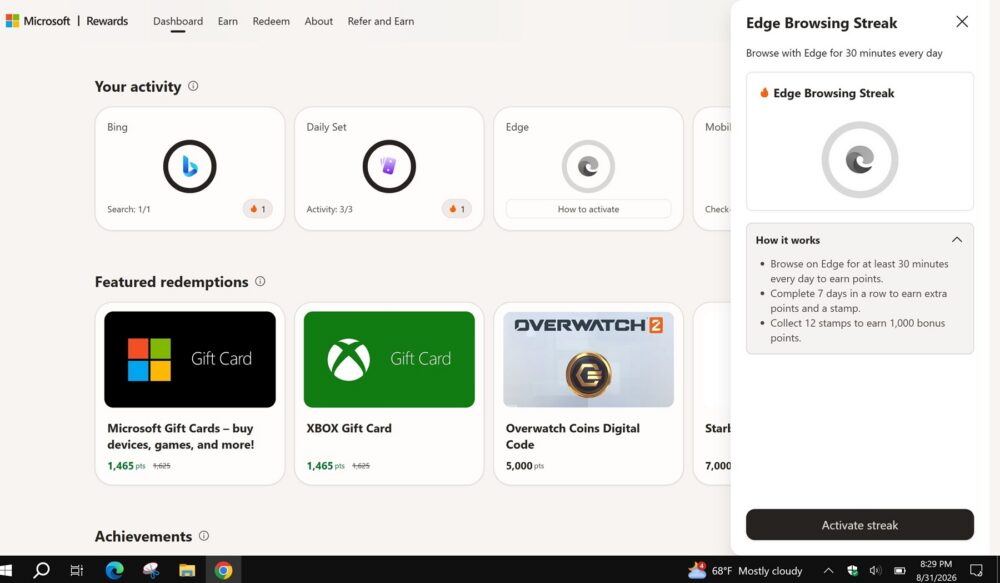
Did you know that using Microsoft Edge throughout the month earns an additional 300 bonus points? It is true, and it was something I did not even notice because Edge is my default browser on my laptop and phone. However, I have a friend who does not use Edge as their default, and I noticed that they had a message about that in their profile saying they could earn additional points. Here’s the full breakdown on how to earn additional points each month by using Edge.
Key Summaries
- The Edge Browsing Streak rewards you for using Microsoft Edge for at least 30 minutes a day, while signed in with your Microsoft account.
- You need to keep the streak going for 7 consecutive days to earn the full 300-point bonus.
- It works across PC, mobile phone, and Xbox — any device where you’re signed into Edge counts toward your daily 30 minutes.
- Completing a 7-day streak earns you a “stamp.” Collect 12 stamps and Microsoft throws in an extra 1,000-point bonus on top.
- This is a rotating, invite-style promotion — it isn’t guaranteed to appear on every account, and availability depends on your region and Rewards status.
Recommendation: Activate the Streak From Your Rewards Dashboard
The offer shows up as a card labeled “Edge Browsing Streak” on the Microsoft Rewards dashboard or inside Edge itself, with an “Activate streak” button. You have to click that button before your browsing time starts counting — simply using Edge without activating the offer won’t earn you anything. Once activated, a small flame icon and a progress ring track how close you are to your daily 30-minute goal.
Microsoft’s own promo page describes the mechanics plainly: stay signed in to Edge with your Microsoft account, then search, shop, and game for at least 30 minutes a day to earn bonus points every day you hit that mark. Do it for 7 days in a row and the streak completes, unlocking the full 300-point payout for that cycle
It Works on PC, Mobile, and Xbox to Earn Bonus Points

One detail that trips people up is assuming this only applies to desktop browsing. It doesn’t. Microsoft has built the Edge Browsing Streak to count time across the platforms where Edge and Rewards already live:
- PC — the classic use case. Leave Edge open on Windows or Mac, stay signed in, and browse normally for half an hour.
- Mobile phone — the Microsoft Edge app for iOS and Android tracks the same streak, so scrolling news, shopping, or searching from your phone counts just as much as desktop time.
- Xbox — Edge is a built-in app on Xbox consoles, and Microsoft explicitly includes Xbox as an eligible device for Rewards activities, including Edge-based ones. If you already have your console on for gaming, opening Edge there for a bit can chip away at your daily streak goal without extra effort.
That cross-device flexibility matters because it means you don’t have to sit at a desktop for 30 uninterrupted minutes. Ten minutes checking headlines on your phone at breakfast, some browsing on your Xbox in the evening, and a bit of work-related searching on your PC can realistically add up across the day — though it’s worth noting Microsoft’s tracking is generally understood to look at active, signed-in Edge usage rather than a strict single continuous session, so consistency matters more than any one long sitting.
Stamps Are the Real Long-Term Payoff

The 300 points for a single 7-day streak are nice, but the bigger incentive is the stamp system layered on top. Every time you complete a full 7-day streak, you earn one stamp. Once you’ve collected 12 stamps, Microsoft adds a 1,000-point bonus on top of everything you’ve already earned from the individual streaks. In practice, that means a member who keeps the streak alive consistently could be looking at several thousand extra points over the course of the promotion, on top of normal daily search and activity points.
This stamp structure is part of a broader shake-up to how Microsoft Rewards pays out points. In 2026, Microsoft restructured the program around monthly-reset tiers (Member, Silver, and Gold) and tightened daily search caps significantly compared to the old Level 1/Level 2 system. Streak-based bonuses like this one have become a more prominent way for the program to reward consistent engagement now that raw search points are worth less than they used to be (Microsoft Rewards’ 2026 Overhaul: Member, Silver, Gold, and the New Rules).
Genuine, Signed-In Browsing — Not Just an Open Tab
As with most Rewards promotions, Microsoft is looking for real usage, not a browser window left idle in the background. To have your time count:
- You need to be actively signed in to Edge with the same Microsoft account linked to your Rewards profile.
- Your browsing should involve genuine activity — searching, shopping, reading, watching, gaming — rather than a blank tab sitting untouched.
- The 30-minute threshold resets each day, and missing a day breaks the streak, dropping you back to day one rather than just pausing your progress.
If you use a browser extension or privacy tool that blocks Microsoft’s tracking scripts, or if you frequently browse in InPrivate mode, that activity likely won’t be counted toward your streak, since InPrivate sessions don’t tie back to your signed-in profile in the same way.
This Offer Doesn’t Show Up for Everyone
Unlike the core ways to earn Rewards points — daily searches, quizzes, and the Daily Set — the Edge Browsing Streak is a promotional, rotating offer rather than a permanent fixture of every account. Microsoft support forums have fielded plenty of questions from members whose dashboard simply doesn’t show the streak card at all. According to responses in Microsoft’s own Q&A community, that’s expected behavior: the offer is only extended to select Rewards members in select markets at any given time, support staff can’t manually turn it on for an account, and its presence is entirely dependent on Microsoft’s current promotional rollout (Edge Browsing Streak, 30 Minutes – Microsoft Q&A).
If the card isn’t on your dashboard, there’s no fix beyond staying an active, signed-in Edge and Bing user and checking back periodically — Microsoft rotates these regional promotions in and out over time, so an account that doesn’t see it today may see it in a future cycle.
What To Do If Your Points Don’t Show Up
If you activated the streak, hit your 30 minutes for several days, and still don’t see points landing in your dashboard, a few things are worth checking before assuming something’s broken:
- Confirm you clicked “Activate streak” before your browsing session started — time spent before activation doesn’t retroactively count.
- Make sure you were signed into Edge with your Rewards account the whole time, on every device you’re counting toward your daily total.
- Give it a day; Rewards points, especially from bonus and promotional activities, can take up to 24 hours (sometimes longer) to post to your balance.
- Check that your account is otherwise in good standing — Rewards points can be withheld from accounts flagged for unusual or automated-looking activity.
If everything above checks out and points are still missing after a couple of days, Microsoft’s support page for earning Rewards points is the right place to look for troubleshooting steps or to get in touch with support directly (How to earn Microsoft Rewards points – Microsoft Support).