
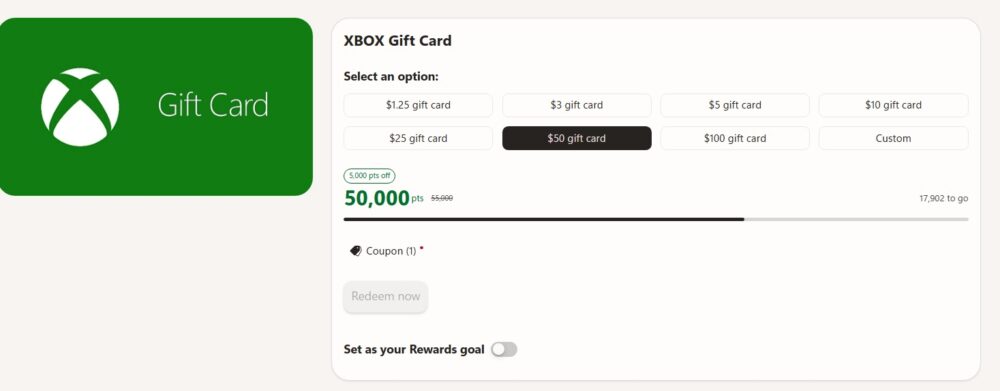
I use to always redeem my Microsoft Reward points for Xbox or Gamepass monthly subscriptions. As an avid Bing user, I was always able to earn GamePass for free each month by redeeming my points. Today, GamePass is more expensive than ever (even with the price reduction), so I’m writing this post to share how to get Xbox Gift Cards to then get GamePass (or games) for free each month using Microsoft Rewards.
What an Xbox Gift Card Costs in Points (August 2026)

Microsoft Rewards redeems Xbox gift cards through a dedicated redemption page, where you pick a dollar amount and the site tells you exactly how many points it’ll cost. As of August 2026, the default $1.25 gift card runs 1,625 points, and independent reporting on this year’s pricing changes confirms a $10 gift card costs 10,000 points. That works out to somewhere between 1,000 and 1,300 points per dollar.
It’s worth noting that Microsoft quietly raised these prices earlier in 2026 — the $10 card previously cost less than it does now. Microsoft doesn’t publish an official changelog for these adjustments, and the exact point cost can vary a bit by region and account, so the smartest move is to check the live redemption page before you commit points to a purchase. But as a planning benchmark: if you’re saving up for a $25 card, budget somewhere in the neighborhood of 25,000–32,000 points.
The gift card itself is a standard Microsoft Store promotional balance — it works on Xbox consoles, Windows, and the Microsoft Store online, needs to be spent within 90 days of being added to your account, and isn’t valid at physical retail locations. Once it lands in your account, you can put it toward games, add-ons, or a Game Pass subscription just like any other Microsoft Store credit.
Ways to Earn Microsoft Rewards Points
Before you can redeem anything, you need points in the bank. Here are the core ways most people build up their balance:
- Daily searches on Bing. Every search on desktop and mobile earns a small number of points, and Microsoft caps how many count each day. It’s not much per search, but it adds up fast when it’s automatic.
- Daily set and punch cards. The Rewards dashboard rotates a handful of quick tasks and quizzes each day — most take under a minute and are worth a fixed point bonus just for showing up.
- Microsoft Edge browsing activities. Using Edge (instead of another browser) unlocks extra point opportunities that aren’t available otherwise. I wrote a blog post about how to earn additional points each month having Bing as your default search engine.
- Xbox app check-ins and gameplay. Daily check-ins in the Xbox mobile app, weekly gaming streaks, and Game Pass quests all add meaningful points on top of your search totals.
- Store purchases. Buying games, DLC, or subscriptions through the Microsoft Store earns a base rate of points per dollar spent, with multipliers for higher membership levels.
- Referrals and promotional offers. Periodic bonus offers and referring friends to Microsoft Rewards can add lump sums of points outside your normal routine.
None of these alone will get you to a gift card overnight, but stacking them consistently is how most people cross the redemption threshold in a matter of weeks rather than months.
Set Bing as Your Default Search Engine for a Monthly Bonus

One of the easiest points boosts is one you only have to set up once: keeping Bing as your default search engine. Microsoft rewards this with a flat monthly bonus — currently an extra 350 points — as long as Bing stays your default for at least 14 days out of the month, and those days don’t need to be consecutive.
The simplest way to qualify is to use Microsoft Edge, where Bing is already the default search engine out of the box. If you’re on Chrome, Firefox, or Safari, you can switch your default search engine to Bing in a couple of clicks through your browser’s settings. Just make sure your searches are genuine and that you’re signed into your Microsoft account while you search, since automated or nonsensical queries won’t count. We’ve written a full walkthrough of the requirements and troubleshooting tips in How Does the Default Search Bonus Work for Microsoft Rewards? — it’s a five-minute setup that pays out every single month without any extra effort on your part.
Why Xbox Owners Have an Edge — and Why Game Pass Is a Smart Redemption

Here’s where things get interesting for gamers specifically. If you own an Xbox or subscribe to Game Pass, you’re sitting on point-earning opportunities that non-gamers simply don’t have access to. Daily Xbox app check-ins, weekly console and PC gaming streaks, and Game Pass-exclusive quests can multiply your monthly point total well beyond what searches and quizzes alone provide. Game Pass Ultimate subscribers combined with a higher Rewards membership level can even see purchase multipliers stack up to a significantly higher rate per dollar spent in the Microsoft Store.
We go into much more detail on exactly how this works — including the specific streak bonuses and quest structures — in our companion post, How Xbox Earns You More Microsoft Reward Points. The short version: if you’re already gaming on Xbox or paying for Game Pass, you’re earning points faster than the average Rewards member without changing your habits at all.
That’s also what makes redeeming those points for an Xbox gift card — rather than, say, a sweepstakes entry or a random gift card from another retailer — such a logical move. You’re earning a meaningful chunk of your points through Xbox activity in the first place, so funneling them right back into your Xbox or Game Pass balance keeps the whole loop working in your favor. Instead of letting points sit idle or trickle out on low-value redemptions, you can stack them toward a $10, $25, or $50 gift card and put it straight toward your next Game Pass renewal or game purchase.
Putting It All Together
Start with the basics — daily Bing searches, your daily set, and locking in that default search bonus — and layer Xbox-specific activity on top if you’re already gaming. Check the live redemption page for current point costs before you cash out, since Microsoft has adjusted pricing more than once this year. Do that consistently, and an Xbox gift card funded entirely by points you were going to earn anyway is well within reach every month.