
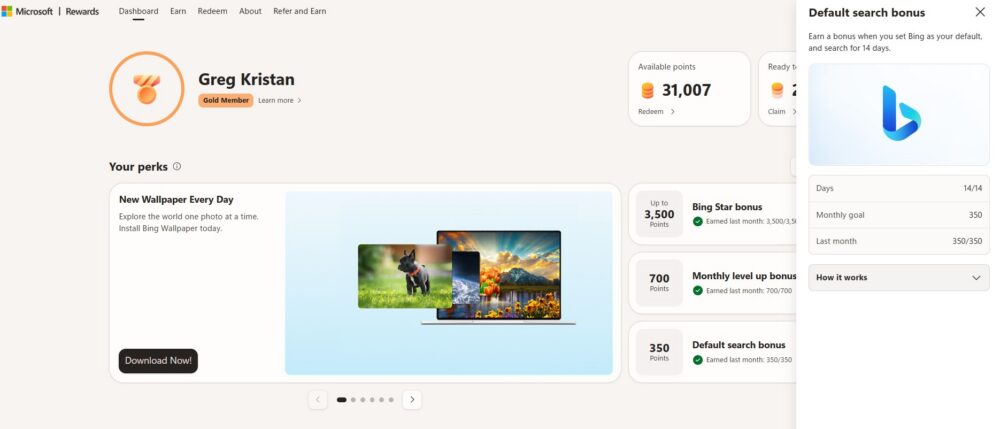
At the start of August, I wrote a blog post about how I earned 4,710 additional points I earned through Microsoft Rewards. One of the overlooked parts of that point total was the Default Search Bonus, which gave me an additional 350 points at the end of the month. 350 additional points is not that many, but it is very easy to get because I actively use Microsoft Edge as my default browser on my Windows 10 and Windows 11 computer, and Edge sets Bing as the default search engine.
If you are looking for ways to earn more Microsoft Reward Points, then you will like what this article has to say.
Key Summaries
- What is It? As of August 2026, you can earn an additional 350 Microsoft Rewards points for keeping Bing as your default search engine
- How Many Days? You need to keep this for 14 days of the month. By using Edge, you already have Bing set as your default search engine on your desktop
- Do They Need to Be Consecutive?: No, you just need to have 14 days of the month with Bing as the default. My recommendation is to do this all month to ensure you get this
- What Types of Searches? The searches need to be genuine searches. The rewards program in 2026 has gotten more strict over the types of search queries they allow
- When Do You Get the Points? A few days into the next month you will get the 350 points. As a note, Microsoft will most likely change this amount at somepoint
Recommendation: Use Microsoft Edge
I like to use Microsoft Edge on my Windows 10 / Windows 11 Surface computers. Edge works well for me, and Bing is the default search engine on that. By having Edge as my default browser / Bing as my default search engine, I already know I will hit this bonus point structure each month.
Here are my settings below on my Windows 11 computer to illustrate what I’m doing. As you can see, I have Microsoft Edge set as the default browser for my computer. Bing, by default, is the default search engine for the browser, which makes it very easy to hit this goal.

Other Browsers Work – Just Set Bing as the Default Search Engine
If you don’t want to use Edge, you can still hit this bonus on Safari, Chrome, Firefox, or any other browser. All you need to do is go into the settings for that browser and change the default search engine to Bing.
However, I don’t recommend this for a few reasons
- Bing works better on Edge in my opinion. Edge has more capabilities where they bake Bing into the ecosystem, so it is easier to get the points by using Edge. For example, I can highlight text on Edge in an article and search for it on the side which counts as Bing search. By having a different search engine on Edge, some of those features won’t work
- Google Chrome wants you to use Google. There will be banners to switch your browser to Google if you change it to Bing. Sometimes you might hit ok without knowing, which will then change all of your searches to Google. That will make it harder to hit the goal
- Other browsers at anytime can change your settings. By using Edge, you know that the search engine will be Bing no matter what. Firefox or any other browser can strike up a new search deal which can change your search engine on an update.
Genuine Searches for 14 Days – And Be Signed In
The easiest way to hit this goal is to search for 14 days genuinely and to be signed into your account. That means search normally on Bing and you will be fine. If you type in gibberish or perform searches like 1 enter, 2 enter, 3 enter, etc. Bing won’t count these as actual searches. Treat the Bing searches normally and you will be rewarded
Mobile Searches Don’t Count for This Reward
I’m surprised that there is not an Edge or Bing bonus feature for mobile. Instead, Microsoft is focused on desktop search, and that makes the most sense since their mobile market share is very small. You can see the breakdown globally on GS Stat Counter that explains Bing’s usage on desktop compared to mobile.
As of July 2026, Bing has a 4.47% market share across all devices globally
As of July 2026, Bing has an 8.84% market share across desktops globally. 10% if you count Yahoo

Compare this to their less than 1% global market share when it comes to mobile.

The reason why I share this is that if you use the Bing app on your phone, you will not hit these points at the end of the month. These points are only available on desktop searches.
What To Do If You Did Not Get These Points?
If you did these searches and never got your points about five business days into the next month, you can always create a support ticket with Microsoft. Microsoft will need you to fill out your information so their team can take a look into why you did not earn these points. Assuming that you did not violate their guidelines and did genuine searches, you should be fine.
From my perspective, Microsoft Rewards is responsive but not always giving you the answer that you want. For example, I got an unusual search activity message on my account for a few weeks, which was very surprising. The issue was that Bing support will never say exactly what the issue is, so I had to figure this out on my own. What I found out was that I was getting the reading rewards bonus too quickly each morning, so I spaced that out throughout the day and the message got removed.
So, you should reach out to Microsoft Rewards support if you are not getting these points. However, they will never tell you exactly what the issue is if there is one, but you will get a response.