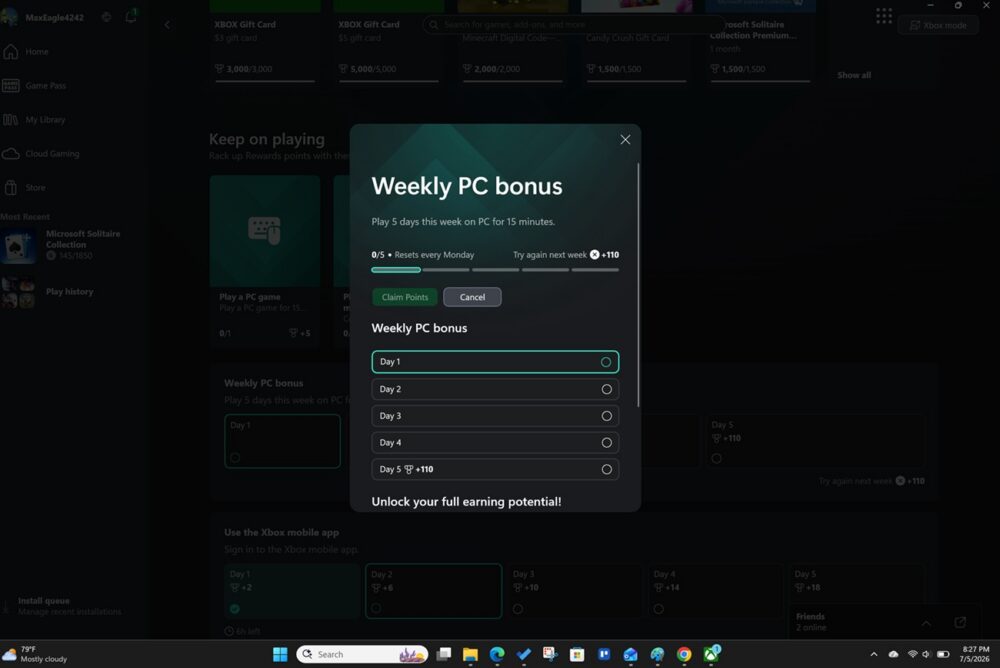
The Weekly PC Bonus is one of the easiest Microsoft Rewards opportunities for people who already use a Windows computer. Instead of only earning points by searching on Bing, using Microsoft Edge, or completing dashboard activities, Microsoft also lets users earn points for playing games through the Xbox app on a Windows PC. Microsoft officially lists “The Xbox app for Windows” as a way to earn points by playing games on a Windows PC desktop.
In simple terms, the Weekly PC Bonus rewards you for playing a qualifying PC game during the week. For many users, the task requires playing a PC game for at least 15 minutes on five different days during the weekly period. Xbox Support states that a minimum of 15 minutes of playtime is required for a quest, and the Weekly PC Bonus unlocks by playing for the required time on a Windows PC.
For me, the easiest game to use is Microsoft Solitaire since it came for free with my the Xbox app. It is simple, quick to open, and does not require much effort. I can launch Solitaire, play a few rounds, and let the Xbox app recognize the activity. Plus, I don’t need to buy a new game to collect the points for Microsoft Rewards.
Key Summaries
- The Weekly PC Bonus is a Microsoft Rewards task that lets users earn points by playing qualifying PC games through the Xbox app on a Windows computer.
- Many users complete the bonus by playing a PC game for at least 15 minutes on five different days during the weekly period.
- Microsoft Solitaire is one of the easiest games to use because it is simple, quick to open, and commonly tracks through the Xbox app.
- The Weekly PC Bonus can often be worth around 250–260 points per week, but the exact amount can vary by account, region, Rewards level, and Game Pass plan.
How the Weekly PC Bonus Works

To complete the Weekly PC Bonus, you need to use the Xbox app on your computer. Once you are signed in with your Microsoft account, you can check the Rewards section inside the Xbox app to see what tasks are available. Microsoft’s Xbox Rewards page says users can earn points by playing games, completing quests, and claiming points across Xbox consoles, PC, handhelds, and other devices.
The most important part is consistency. This is not usually a one-and-done task. You need to play a qualifying PC game on multiple days during the week. In many cases, that means five days of activity, with each session needing to last at least 15 minutes.
Once the Xbox app tracks enough completed days, the Weekly PC Bonus becomes available to claim. That “claim” part matters. Sometimes Rewards points do not automatically show up in your balance until you go into the Xbox app and manually claim the reward.
What Games Work for the Weekly PC Bonus?
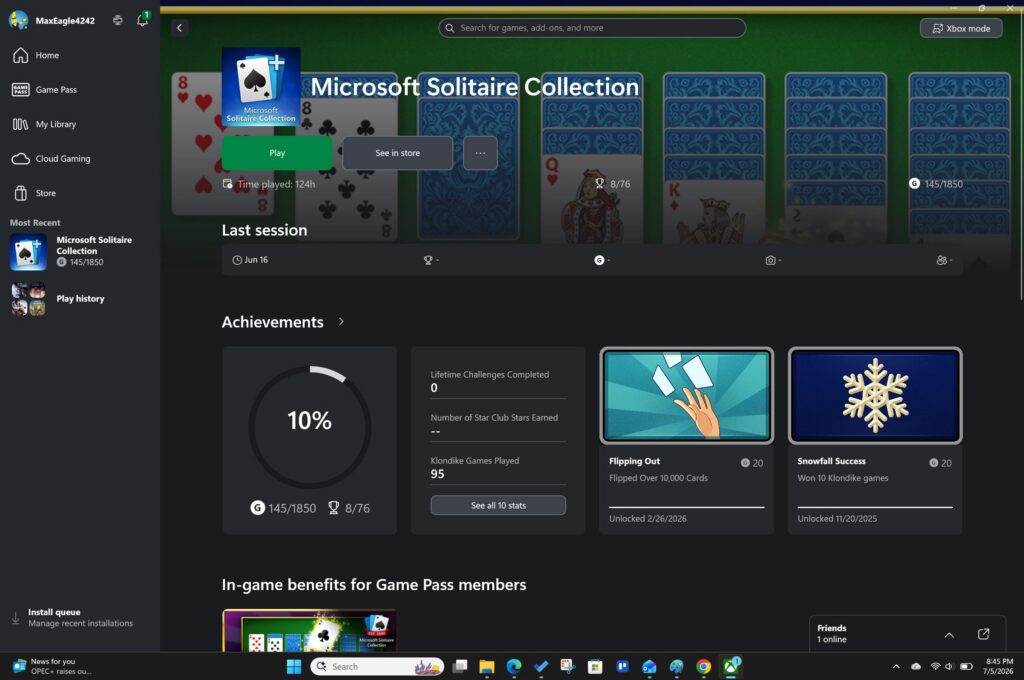
Not every random PC game is guaranteed to work. The game needs to be recognized by Microsoft’s Rewards system. Game Pass PC games are often the obvious choice, but simple Microsoft games can work well too.
The game I use is Microsoft Solitaire. Solitaire is a great option because it is easy, familiar, free, and does not require a major time commitment. You do not need to learn a complicated game, join a multiplayer lobby, or sit through a long tutorial. You can simply open the game, play for the required amount of time, and check back in the Xbox app to see if the day counted.
Other games may work, but I would not assume every PC game will count. The best way to test a game is to open the Xbox app, play the game for at least 15 minutes, and then check whether your Rewards progress updates. If it does, you know that game is working for your account.
How Many Points Can You Get?
The number of points you can get from the Weekly PC Bonus can vary. Microsoft makes it clear that Rewards point values vary by local market, Rewards level, Game Pass plan, and the number of points redeemed.
That said, many users may see the Weekly PC Bonus worth around 250 to 260 points per week. Pure Xbox reported that, after Xbox Rewards updates, the Weekly PC Bonus and Weekly Console Bonus granted 260 points for playing five days per week. Older reports have also shown PC players earning up to 250 Rewards points per week by playing a PC game for 15 minutes on five different days.
So, depending on what your account shows, the Weekly PC Bonus may be worth around 250–260 points per week.
That can add up over time:
- 250 points per week equals about 1,000 points over four weeks.
- 260 points per week equals about 1,040 points over four weeks.
- Over a full year, 260 points per week would equal 13,520 Microsoft Rewards points.
That is only from the Weekly PC Bonus. It does not include Bing searches, daily sets, Xbox mobile app tasks, console tasks, shopping points, or other Microsoft Rewards promotions.
Why Solitaire Is My Go-To Game
The reason I use Solitaire is simple: it is easy. Some Microsoft Rewards tasks can feel like work, especially when they involve multiple searches, quizzes, punch cards, or specific games. Solitaire is different because it is familiar and does not require much setup.
You can open the game, play casually, and work toward the PC bonus without needing to commit to a full gaming session. For people who are mostly using Microsoft Rewards to collect points for gift cards, Xbox credit, or other redemptions, that matters.
Solitaire is also good because it is not distracting. You do not need a controller. You do not need headphones. You do not need to download a massive game. For me, it is one of the simplest ways to complete the PC gaming requirement.
Tips to Make Sure the Weekly PC Bonus Tracks
The biggest issue with the Weekly PC Bonus is tracking. Sometimes the Xbox app does not update immediately. To improve your chances of getting credit, make sure you are signed into the correct Microsoft account in both the Xbox app and the game you are playing.
You should also play longer than the minimum when possible. If the task says 15 minutes, playing for 16–20 minutes gives the system a little extra room to register the session. After playing, check the Rewards section in the Xbox app to confirm that the day counted.
It is also smart to avoid waiting until the last minute. Since the Weekly PC Bonus usually requires multiple days of play, missing one or two days can prevent you from completing the task for that week.
Is the Weekly PC Bonus Worth It?
Yes, the Weekly PC Bonus is worth doing if you already use Microsoft Rewards and have access to the Xbox app on your computer. It is not going to make you rich, but it is a simple way to stack extra points each week.
The biggest benefit is that it can become part of a routine. Open Solitaire, play for 15 minutes, check the Xbox app, and repeat that process throughout the week. When combined with Bing searches, daily sets, Xbox app tasks, and other Rewards opportunities, the points can add up faster than many people expect.
The main thing to remember is that Microsoft Rewards changes often. Your account might show a different point value than someone else’s account. Your country, Rewards level, Game Pass plan, and available quests can all impact what you see. The best answer is always to check the Xbox app on your own computer to confirm the current point total.
Overall, the Weekly PC Bonus is one of the easiest Microsoft Rewards activities because it rewards something simple: playing a PC game. For me, Microsoft Solitaire is the easiest way to complete it. If your account shows the Weekly PC Bonus, it is worth adding to your weekly Microsoft Rewards routine.